

There’s no shortage of antivirus tools claiming to “protect everything.” Most of them blur together after a point, same promises, same features, same marketing language.
But Norton has been around long enough to be judged differently.
This isn’t a new player trying to prove itself. It’s one of the oldest names in cybersecurity, and that comes with both expectations and scrutiny.
So instead of repeating generic claims, this Norton review focuses on what actually matters in 2026:
- How well it protects
- What you really get in each plan
- Where it still falls short
Norton at a Glance
Norton today is no longer “just antivirus.”
It’s a bundled security suite that includes:
- Malware protection
- VPN
- Password manager
- Cloud backup
- Identity monitoring
That sounds impressive on paper, and to be fair, it largely delivers.
But the real question is: does it justify the price and complexity?
Norton Antivirus Review: Security Performance
Let’s start with the core function, protection.
Detection & Lab Results
Norton consistently ranks at the top in independent testing.
- Near-perfect malware detection rates
- Strong ransomware blocking
- Excellent phishing protection
For example, it has scored 100% detection in multiple AV-Test scenarios and around 99.5%+ in AV-Comparatives real-world tests
That puts it in the same league as top-tier competitors.
But raw scores don’t tell the full story.
Real-World Behavior
In actual usage:
- Threats are blocked quickly
- Suspicious downloads are flagged instantly
- Phishing sites are often stopped before loading
It’s aggressive which is mostly good but sometimes that leads to false positives (blocking safe files).
Not a dealbreaker, but noticeable.
Where Norton Still Stands Out
 There are plenty of antivirus tools with good detection rates. What makes Norton different is the depth of its ecosystem.
1. Smart Firewall
Unlike basic firewalls, Norton actively monitors both incoming and outgoing traffic.
It’s more configurable than the default Windows firewall and adds a meaningful layer of control.
2. AI Scam Protection
This is one of the more relevant additions in recent versions.
Norton now scans:
- Emails
- Messages
- Websites
It looks for patterns typical of phishing and scam attempts especially useful as AI-generated scams become more common.
It’s not perfect, but it’s a step in the right direction.
3. Password Manager (Surprisingly Good)
Many bundled password managers feel like afterthoughts.
Norton’s isn’t.
- Uses AES-256 encryption
- Syncs across devices
- Includes 2FA
It’s not as advanced as standalone tools, but for most users, it’s more than enough.
Norton VPN Review: Useful, But Not a Replacement
Norton includes a VPN in its 360 plans, which is a nice addition, but let’s be clear about its role.
What It Does Well:
- Encrypts browsing traffic
- Hides IP address
- Includes kill switch and split tunneling
Where It Falls Short:
- Not as fast as dedicated VPNs
- Limited advanced controls
And importantly:
👉 The VPN is not available in India due to regulatory requirements
So if you’re based in India, this feature doesn’t add value.
Norton Utilities Ultimate Review
This is where Norton goes beyond “security.”
Norton Utilities Ultimate focuses on performance optimization.
In practice, it helps:
- Clean junk files
- Reduce startup load
- Fix registry issues
- Improve responsiveness
It’s useful, but not essential.
If your system is already optimized, you won’t notice dramatic changes. But on older machines, it can make a difference.
Norton Pricing Review: Which Plan Actually Makes Sense?
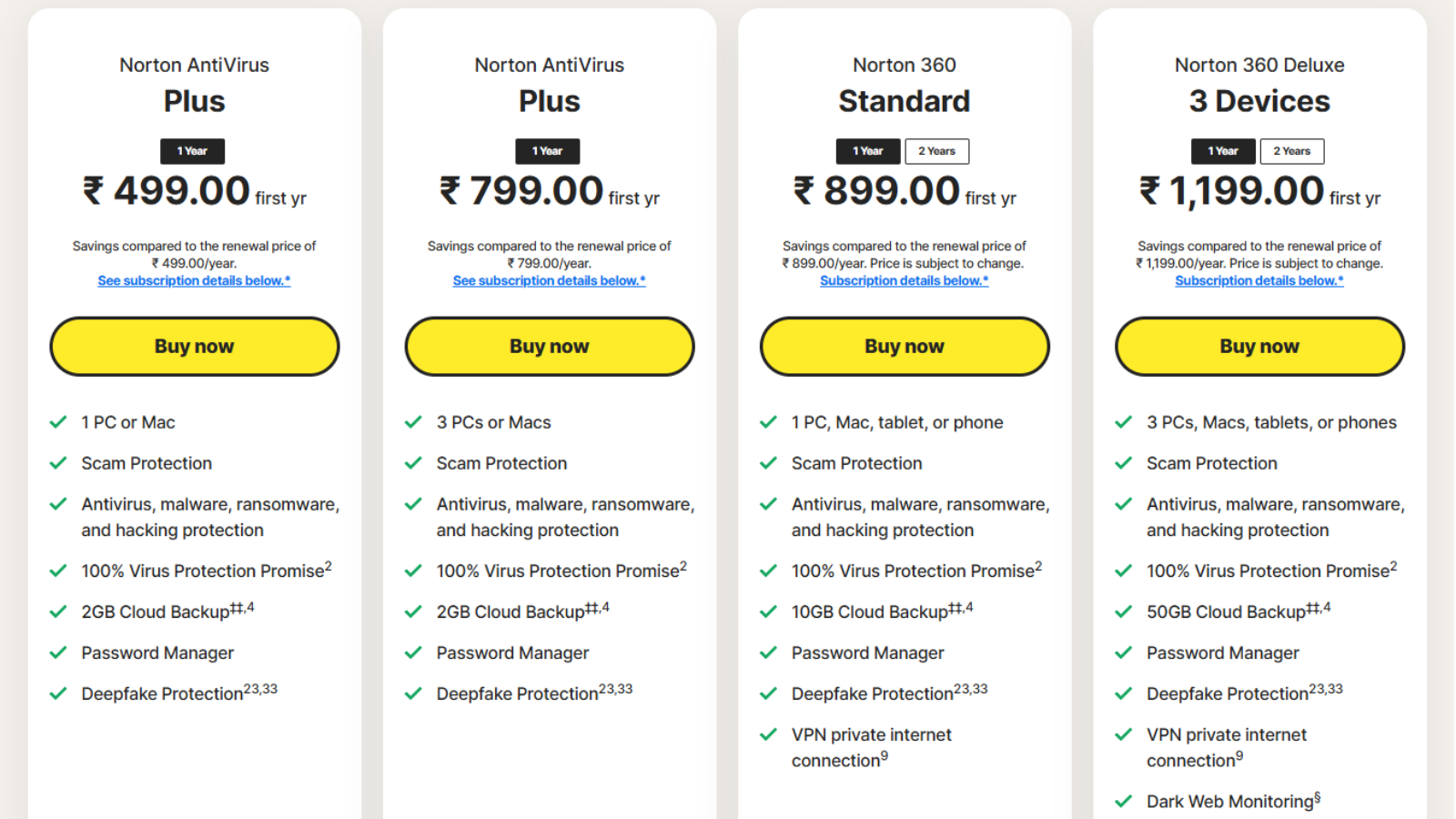
Norton’s pricing looks simple at first glance, but once you break it down, the differences between plans become more meaningful, especially in terms of value per device and feature access.
Let’s go through each plan based on what you actually get.
1. Norton AntiVirus Plus (₹499/year – 1 Device)
This is Norton’s most basic plan, designed for users who only need protection on a single device.
What you get:
- Protection for 1 PC or Mac
- Antivirus, malware, ransomware protection
- Scam and deepfake protection
- Password manager
- 2GB cloud backup
Who it’s for:
If you’re using just one device and want essential protection without extra features like VPN, this plan covers the basics.
Consideration:
While it offers solid protection, limiting coverage to one device may not suit users who rely on multiple devices daily.
2. Norton AntiVirus Plus (₹799/year – 3 Devices)
This plan builds on the previous one but increases device coverage.
What you get:
- Protection for up to 3 devices
- Same core security features as the base plan
- Password manager
- 2GB cloud backup
What’s better here:
The main advantage is flexibility. You can secure multiple devices under one subscription without paying separately.
Consideration:
Although the pricing is more reasonable per device, it still lacks additional features like VPN or cloud storage upgrades that are becoming standard in bundled security tools.
3. Norton 360 Standard (₹899/year – 1 Device)
This is where Norton moves beyond basic antivirus and starts offering a more complete security package.
What you get:
- Protection for 1 device (PC, Mac, mobile)
- Antivirus and scam protection
- Password manager
- 10GB cloud backup
- VPN (private internet connection)
What stands out:
The addition of a VPN and increased backup storage makes this plan more useful for privacy-focused users.
Consideration:
Even with better features, restricting the plan to one device reduces its practicality, especially when compared to other plans in the same price range.
4. Norton 360 Deluxe (₹1,199/year – 3 Devices)
This plan offers a more complete package and is often considered the most balanced option.
What you get:
- Protection for up to 3 devices
- Antivirus, malware, ransomware protection
- Scam and deepfake protection
- VPN included
- Password manager
- 50GB cloud backup
- Dark web monitoring
Why it stands out:
This plan combines security, privacy, and backup features into a single package. The higher cloud storage and added monitoring tools make it more practical for everyday use across multiple devices.
Consideration:
For users who want a complete security setup without upgrading to higher-tier plans, this option provides a more balanced mix of features and coverage.
Ease of Use: Clean, But Not Simple
Norton’s interface is polished.
But “polished” doesn’t always mean simple.
What works:
- Dashboard is well designed
- Key features are accessible
- Setup is quick
What doesn’t:
- Too many sections
- Features split across windows
- Slight learning curve
For non-technical users, it can feel a bit overwhelming at first.
Performance Impact: Still a Concern?
This is where opinions start to split.
The reality:
- Background protection → minimal impact
- Full scans → noticeable slowdown (especially on older systems)
Forbes highlights that Norton can be resource-intensive during scans
That aligns with real-world experience.
It’s not unusable, but it’s not the lightest antivirus either.
Compatibility & Limitations
Norton works across:
- Windows
- macOS
- Android
- iOS
But here’s the nuance:
- Some features are Windows-only
- Mobile apps are stripped down
- VPN not available in India
So while it’s “multi-platform,” the experience isn’t equal everywhere.
Pros and Cons (No Fluff)
What Norton Does Well:
- Consistently strong malware protection
- Wide range of features in one package
- Reliable real-time protection
- Solid password manager and firewall
Where It Falls Short:
- Pricing increases after renewal
- Interface can feel crowded
- VPN limitations (especially in India)
- Performance impact during scans
How It Compares to Competitors
Norton competes with tools like:
- Bitdefender
- Kaspersky
- Avast
Key Difference:
- Norton = “All-in-one ecosystem”
- Others = Often better at specific areas (price, performance, or simplicity)
If you want everything in one place, Norton makes sense.
If you prefer lightweight tools, alternatives may suit you better.
Real User Sentiment (Not Just Marketing)
From community discussions, the feedback is mixed, but telling:
“Solid protection… VPN and backup feel useful.”
At the same time:
“Pricing can feel steep… especially yearly subscriptions.”
And that sums it up well.
Norton is rarely criticized for security, only for experience and pricing.
Who Should Actually Use Norton?
Good Fit:
- Users who want everything in one tool
- Families managing multiple devices
- People who value security over simplicity
Not Ideal For:
- Budget-focused users
- Those wanting lightweight software
- Users in India expecting VPN access
Final Verdict
Norton in 2026 is not trying to be the simplest antivirus.
It’s trying to be the most complete one.
And in many ways, it succeeds.
- Security → Excellent
- Features → Extensive
- Usability → Good, but layered
- Pricing → Fair, but not cheap
If you’re looking for a single solution that covers security, privacy, and basic optimization, Norton is still one of the strongest options available.
If you just want a quiet, lightweight antivirus, you might find it overkill.
FAQs
Is Norton antivirus good in 2026?
Yes. It offers strong protection, high detection rates, and a wide feature set backed by consistent lab performance.
Does Norton slow down your computer?
Not significantly during regular use, but full system scans can impact performance on older devices.
Is Norton VPN worth it?
It’s useful for basic privacy, but not a replacement for dedicated VPN services. Also unavailable in India.
What is Norton Utilities Ultimate?
A performance optimization tool that helps clean and speed up your system