

Website speed matters more than ever. With dwindling attention spans and ever-higher expectations for smooth browsing, a slow page can cost you readers — and conversions. Among many factors, unoptimized images are often the biggest culprits behind sluggish load times. That’s where Imagify comes in — a WordPress plugin built to compress, resize, and optimize images automatically. In this review, I’ll take you through what Imagify does, why it works, and whether it’s worth including in your WordPress toolbox.
Why Image Optimization Matters?
Visuals — photos, graphics, product images, banners — make websites appealing, engaging, and professional. But they also come with a burden: heavier files. High-resolution or uncompressed images can slow down page load times, leading to:
- Frustrated visitors and higher bounce rates
- Poor performance scores (especially on tools like PageSpeed)
- Negative impacts on SEO and Core Web Vitals
- Slower browsing, especially on mobile or slower connections
Image optimization helps by stripping away unnecessary data (metadata, redundant pixels) or by compressing images so they remain clear but lighter. The result: faster load times, better user experience, and improved performance metrics.
For anyone running a content-heavy blog, an eCommerce store, or an image-rich site — optimizing images isn’t optional. It’s essential.
What Is Imagify (and Why It Stands Out)?
Imagify is a dedicated image-optimization plugin for WordPress. It doesn’t ask you to manually resize each image or fiddle with Photoshop before uploading. Instead — when you upload an image, Imagify automatically optimizes it.
That means you can focus on writing, designing, or managing content — and let Imagify handle image performance behind the scenes.
Here’s what makes it stand out:
- Automatic optimization on upload (no manual work required).
- Bulk optimization — handle entire media libraries at once.
- Support for modern image formats such as WebP and AVIF for better compression.
- Option to resize images automatically to fit your layout.
- Backup + restore capability — you can revert to original images if needed.
- Support for JPG, PNG, PDFs (and more), so it’s not limited to just photos.
- Works across multiple websites (useful if you manage more than one site).
In short: Imagify brings together compression, conversion, resizing, and backups — in a plugin that sits seamlessly in WordPress.
Imagify Features — Detailed Look
Here’s a breakdown of the core features of Imagify — and how each helps optimize your website.
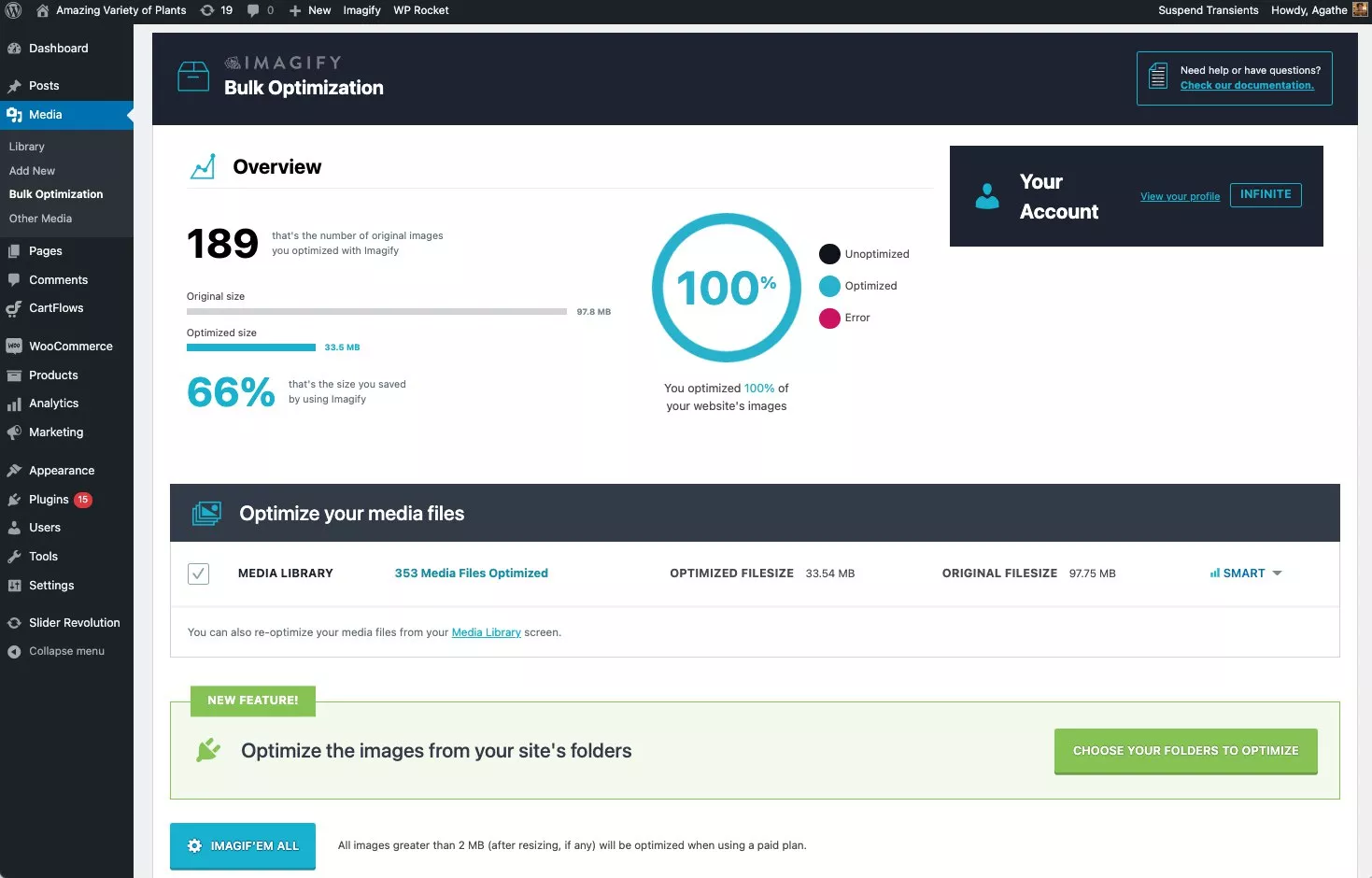
Bulk Optimization — One-Click for All Images
If your WordPress site already has hundreds (or thousands) of images in its media library, optimizing them manually can be tedious. Imagify’s bulk optimization runs asynchronously — that means it processes images in the background while you continue working. It’s ideal for older blogs, magazine-style sites, or stores with many product images.
Smart Compression & Lossless Options
Imagify doesn’t just compress blindly — it offers intelligent compression modes so you can balance quality and size:
- Smart Compression: Reduces file size significantly while maintaining good visual quality — perfect for everyday blog images or site graphics.
- Lossless Compression: If you deal with high-quality photos, logos, or detailed graphics where clarity matters, this mode compresses files with no visible quality loss.
This flexibility ensures that whether you need lots of images or crystal-clear visuals, you can choose what fits best.
Automatic WebP / AVIF Conversion
Next-gen image formats like WebP and AVIF deliver similar (or better) visual quality at drastically reduced file sizes compared to JPEG or PNG. Imagify supports automatic conversion to WebP or AVIF — optimizing load times without extra effort.
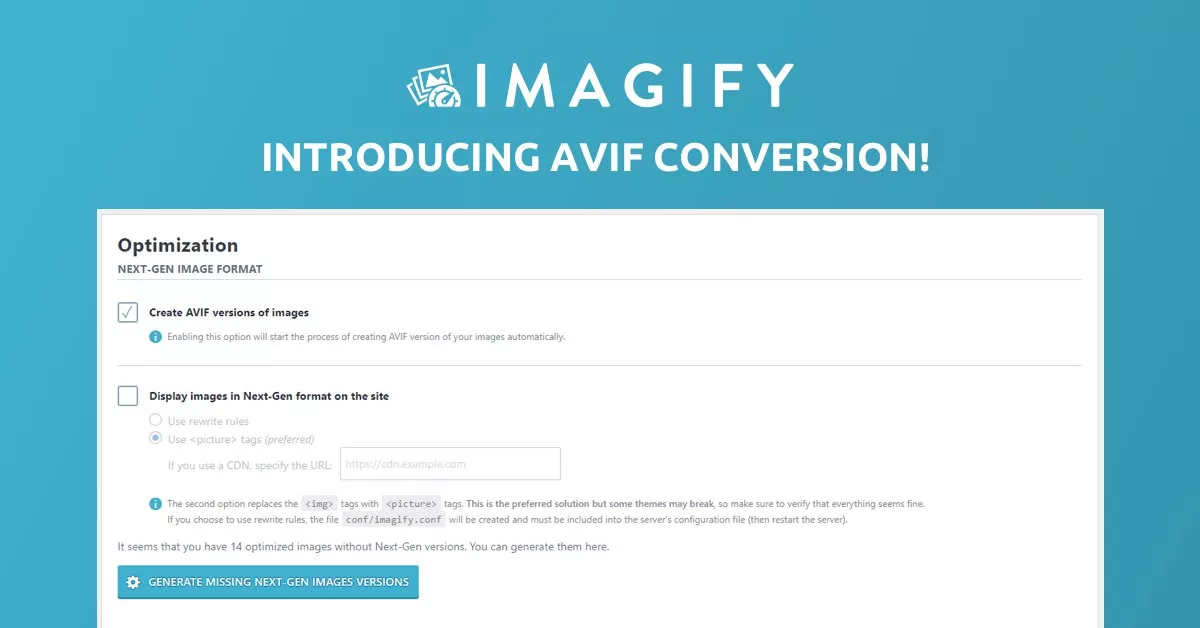
With this conversion in place, your site can serve lighter images to modern browsers — a simple but effective speed upgrade.
Automatic Resizing
Sometimes images uploaded are way larger than needed (especially if created on high-res displays). Imagify can automatically resize images to your chosen maximum dimensions, cutting unnecessary size and improving performance without you touching Photoshop.
This is especially helpful for blog thumbnails, hero sections, or product galleries — anywhere consistent image size matters.
Backup and Restore — Safe Optimization
Worried about losing the original quality? Imagify automatically stores a backup of every original file. If you ever need — for example, for print-quality downloads or re-editing — you can restore the original version anytime.
This safety net makes it easy to experiment with compression levels without fear of permanently degrading image quality.
Multi-format and Media Type Support (JPG, PNG, GIF, PDF, etc.)
Imagify isn’t just limited to photos. It can optimize PDFs, GIFs, and common graphic formats. That’s a plus if your site offers downloadable brochures, has GIF animations, or uses PNG graphics.
This versatility makes Imagify suitable not only for blogs, but for e-commerce, portfolios, agencies, and more.
Seamless WordPress Integration
Because Imagify is a WordPress plugin, it integrates directly with the WordPress Media Library. Uploading images, optimizing them, converting; it all happens behind the scenes. No need to leave your dashboard or use external software.
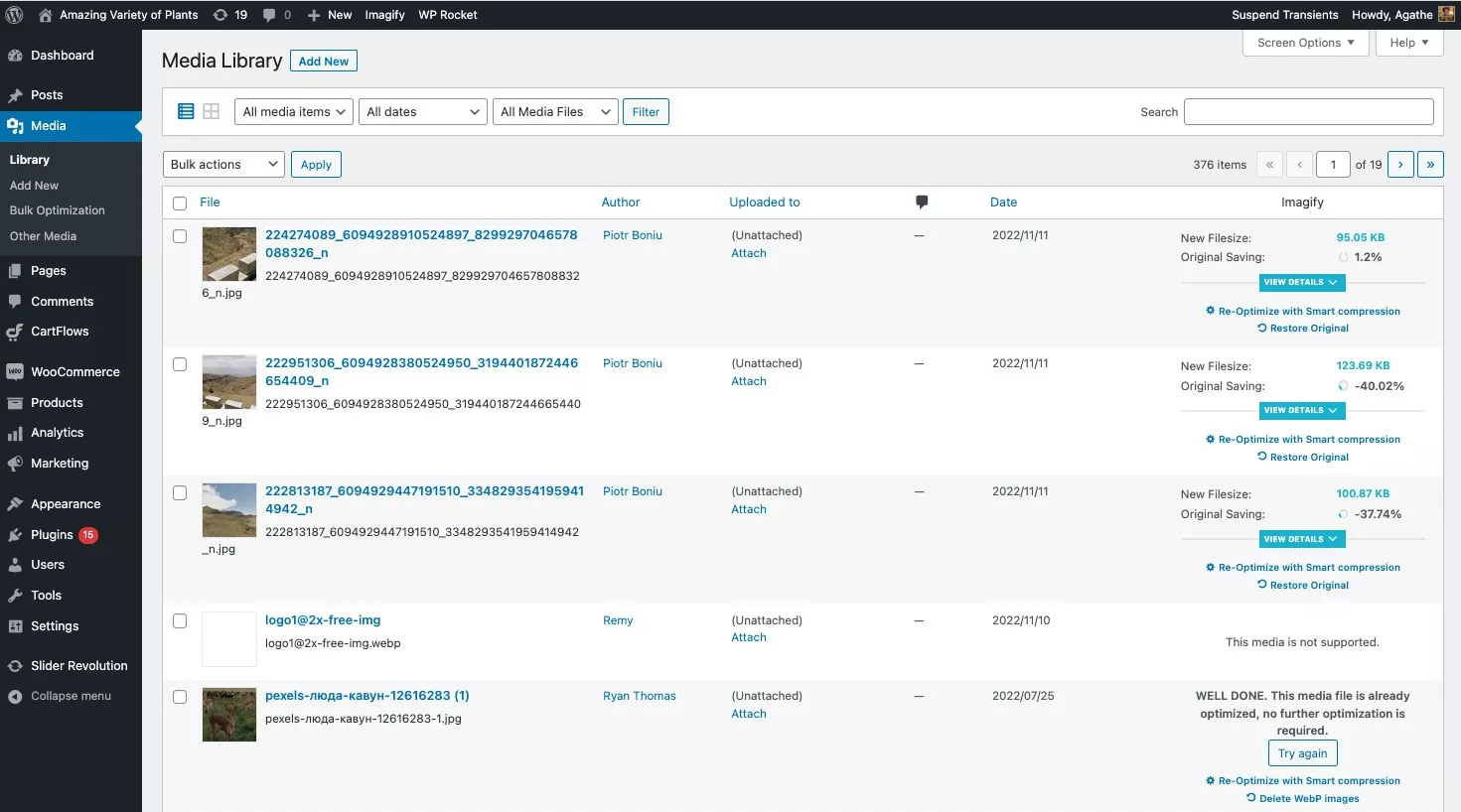
This simplifies the workflow, especially for content creators, marketers, and non-tech users.
Imagify Pricing — What You Pay (and What You Get)
Imagify keeps its pricing simple and genuinely budget-friendly. The Starter plan is completely free, offering 20MB per month — enough for small blogs or anyone wanting to test the plugin. For growing sites, the Growth plan at $4.99/month (billed yearly) gives you 500MB, roughly 5,000 images, plus unlimited websites and affordable $5 add-on GBs.
But the real standout is the Infinite plan at $9.99/month, billed yearly. It gives you unlimited images, unlimited upload size, and no hidden costs — making it perfect for agencies, eCommerce stores, and content-heavy sites.
Overall, Imagify’s pricing is straightforward, transparent, and flexible enough to fit beginners, professionals, and high-volume users without breaking the bank.
Pros & Cons — A Balanced View
✅ What Works Well
- Automatic optimization & WebP/AVIF conversion — No manual work required.
- Bulk optimization — Great for large media libraries.
- Flexible compression options — Smart, lossy, or lossless depending on needs.
- Backup/restore — Safe experimentation without permanent risk.
- Supports multiple formats (JPEG, PNG, GIF, PDF, etc.) — Not just photos.
- Beginner-friendly interface and seamless WordPress integration — Minimal learning curve.
- Affordable & flexible pricing plans — From free to unlimited depending on needs.
⚠ What to Keep in Mind
- Free plan is limited — 20 MB/month may not cut it for media-heavy blogs or stores.
- No built-in CDN — For optimal speed, pairing with a CDN is advisable. (You’ll need to integrate separately.)
- Bulk restore after conversion isn’t always easy — Restoring many images one by one can be tedious if you need to revert. Some users report this as a limitation.
- For huge portfolios or high-traffic eCommerce sites, you may need the paid plan — which adds recurring cost.

Who Should Consider Imagify — And Who Might Skip
Ideal for:
- Bloggers and content creators who want image optimization without fuss.
- eCommerce stores with lots of product images needing fast load times.
- Agencies or freelancers managing multiple WordPress sites.
- Portfolio sites, photography blogs, or design agencies needing bulk optimization.
- Anyone targeting better Core Web Vitals and faster page loading.
May not suit:
- Sites with very few images (free quota enough) — you may not need a plugin.
- Users needing built-in CDN + global image delivery (you’ll need to add a separate CDN).
- People who dislike third-party optimization (since Imagify relies on its servers for processing).
Why Imagify Makes Sense for SEO-Focused Writers & Bloggers
Since you often work on long-form, SEO-optimized blogs, here’s why Imagify is especially useful:
- Faster load times: Optimized images significantly reduce page weight — which improves Core Web Vitals, user experience, and SEO ranking.
- Less manual work: Bulk optimization and automatic on-upload compression saves you time you can instead dedicate to content quality.
- Consistency: Every image — whether blog graphics, screenshots, PDFs — stays optimized, keeping your site performance uniform.
- Quality control: With lossless mode and backup/restore, you don’t sacrifice image quality while optimizing.
- Scalability: As your content grows (e.g. multiple blogs, frequent publishing), Imagify grows with you.
For someone who writes many long, content-heavy posts (with images) — Imagify offers a reliable way to keep performance high — without constant manual effort.
Final Thoughts: Is Imagify Worth It?
If you run a WordPress site and care about speed, user experience, and SEO — yes, Imagify is absolutely worth adding.
It delivers: simplicity, automation, flexibility, and results. With support for modern formats like WebP/AVIF, bulk optimization, and clean integration — it covers almost everything an image-heavy site needs.
Even the free Starter plan offers a chance to test performance improvements. As your site grows, you can easily upgrade.
So if you want a hassle-free, powerful, WordPress-ready way to optimize images and speed up your site — give Imagify a try.